




Atosa Freezer Settings, Temperature Controls, Reset & Troubleshooting
Configuring correct Atosa freezer settings is essential for food safety, energy efficiency, and preventing unexpected equipment failure in modern commercial kitchens. Whether operating a heavy-duty solid-door reach-in, a high-visibility glass merchandiser, or a compact chest unit, setting the right target temperature determines how reliably your equipment preserves inventory. Commercial refrigeration operates under aggressive thermal loads, requiring operators to understand how digital set points, ambient kitchen heat, evaporator coil airflow, and mechanical thermostats interact. Incorrect temperature configurations can trigger coil frosting, soft inventory, excessive compressor wear, or regulatory non-compliance during health inspections.
## Key Takeaways: Atosa Freezer Settings & Care
• **Model Identification First**: Always verify your exact Atosa model family before making adjustments, as mechanical dial models and digital Dixell controllers follow fundamentally different operating workflows.
• **Target Temperature Ranges**: Commercial solid-door reach-in freezers typically target -8°F to 0°F (-22°C to -18°C), whereas chest freezers rely on numbered dials where position 4 serves as the standard factory baseline.
• **Avoid Coldest Setting Pitfalls**: Cranking a mechanical dial to its maximum cold setting does not freeze food faster; it frequently causes evaporator coils to ice over, blocking airflow and making the cabinet warmer.
• **Staged Startup Required**: Freshly installed or defrosted freezers must run empty for at least 4 hours to reach thermal equilibrium before any food inventory is loaded.
• **Verify with Independent Tools**: Never rely solely on digital display boards; verify cabinet air and internal product temperatures using calibrated independent thermometer probes.
## Table of Contents
1. [Model Identification & Control System Types](#model-identification--control-system-types)
2. [Standard Temperature Ranges Across Atosa Equipment Lines](#standard-temperature-ranges-across-atosa-equipment-lines)
3. [Step-by-Step Temperature Adjustment & Fast-Freeze Procedures](#step-by-step-temperature-adjustment--fast-freeze-procedures)
4. [Commissioning, Loading & Temperature Verification Workflows](#commissioning-loading--temperature-verification-workflows)
5. [Diagnostic & Troubleshooting Decision Tree for Temperature Issues](#diagnostic--troubleshooting-decision-tree-for-temperature-issues)
6. [Atosa Freezer Settings FAQ](#atosa-freezer-settings-faq)
7. [Sources and References](#sources-and-references)
## Model Identification & Control System Types
Before modifying any thermal controls, you must accurately identify the exact control mechanism installed on your unit. Atosa manufactures commercial refrigeration equipment across several distinct categories, utilizing either electronic micro-processor controllers or mechanical capillary thermostat dials.
### Mechanical Thermostat Dials vs. Digital Controllers
Commercial refrigeration systems govern cabinet temperatures using two primary control philosophies. Older or economy-focused chest freezers utilize mechanical capillary tube thermostats, whereas modern upright reach-ins, worktops, and glass merchandisers incorporate digital electronic micro-controllers (most commonly manufactured by Dixell or Carel).
| Feature / Attribute | Mechanical Thermostat Dial | Digital Controller (e.g., Dixell) |
| :--- | :--- | :--- |
| **User Interface** | Rotary dial marked with numbers (e.g., 1 to 7 or OFF to MAX) | LED display board with SET, UP, DOWN, and defrost keys |
| **Temperature Sensing** | Fluid-filled bulb sensing evaporator coil/air temperature | NTC or PTC electronic thermistor sensor probes |
| **Control Accuracy** | Wide differential band (approx. 4°F to 8°F variance) | Precise digital set point control (tight hysteresis window) |
| **Display Output** | None (requires external internal dial thermometer) | Real-time digital display of cabinet air or probe temperature |
| **Fast-Freeze Capability** | Manual dial position override | Soft key function or controlled automatic cycling |
| **Common Atosa Lines** | Chest freezers (MWF series) | Reach-ins (MBF/MCF), pass-throughs, glass merchandisers |
### Identifying Your Specific Atosa Model Series
Locating your cabinet’s data plate is the critical first step before attempting adjustments or ordering replacement components. The serial tag is typically mounted inside the interior side wall near the top shelf, or on the exterior rear panel. Matching your model number to the correct category prevents applying dial instructions to digital systems or mistaking refrigerator range settings for freezer parameters.
• **Reach-In Solid Door Freezers (MBF Series)**: Stainless steel single, double, or triple-door units equipped with top-mounted or bottom-mounted condensing systems and electronic digital controllers.
• **Glass Door Merchandisers (MCF Series)**: Display units utilizing electronic controllers programmed for specific holding conditions, with distinct lighting and defrost schedules.
• **Pass-Through Cabinets**: Dual-access commercial units engineered for high-volume kitchen prep lines with dedicated electronic set-point logic.
• **Chest Freezers (MWF Series)**: Flat-top solid lid or curved glass lid storage freezers governed by mechanical thermostat dials mounted near the bottom ventilation grill.
When evaluating kitchen layouts, selecting the correct footprint and capacity is as vital as managing temperature control. Review our detailed [upright freezer size guide](https://fedcanada.ca/blog/fit-for-purpose-choosing-the-correct-upright-freezer-size-for-your-commercial-needs) to analyze cabinet dimensioning and thermal distribution needs.
### Set Point vs. Displayed Temperature vs. Product Temperature
Operational confusion frequently arises when kitchen staff observe discrepancies between controller readouts and handheld food thermometer readings. Interpreting these three distinct temperature definitions prevents unnecessary dial tweaking:
1. **Programmed Set Point**: The target air temperature programmed into the digital controller at which the compressor cycles off.
2. **Displayed Cabinet Air Temperature**: The real-time temperature measured by the internal air thermistor probe. During normal refrigeration cycles and door openings, this number fluctuates above and below the set point.
3. **Measured Product Core Temperature**: The actual physical temperature of food inventory stored inside the cabinet. Because solid food density creates thermal inertia, product temperature changes far slower than air temperature.
Understanding these operational dynamics forms the foundation of commercial climate management. For broader insight into refrigeration balance, refer to our complete [guide to restaurant coolers and refrigeration](https://fedcanada.ca/blog/cooling-solutions-a-guide-to-restaurant-coolers).
## Standard Temperature Ranges Across Atosa Equipment Lines
Atosa designs equipment tailored for specific food-holding requirements. Setting a unit outside its engineered operating envelope degrades performance, inflates electrical power usage, and risks severe food spoilage.
### Reach-In & Pass-Through Solid Door Freezers
Commercial solid-door freezers serve as the primary storage workhorses for raw meats, frozen inventory, and bulk prepared items. Standard factory configurations aim for deep sub-zero holding to maintain product integrity during peak line usage.
Referencing the official Atosa pass-through freezer specification sheet, commercial pass-through freezers specify factory design ranges around -8°F to 0°F (-22°C to -18°C), while maintaining safe operating thresholds of -4°F to 1°F during intense kitchen usage.
• **Standard Holding Target**: -4°F (-20°C)
• **Permissible Operating Window**: -8°F to 0°F (-22°C to -18°C)
• **High-Ambient Kitchen Threshold**: Operational stability up to 100°F (38°C) ambient kitchen environment, provided condenser airflow remains unobstructed.
### Glass Door Merchandisers & Showcase Models
Glass-door merchandiser freezers balance interior visibility with consistent holding performance. Because glass doors permit radiation heat transfer, these cabinets rely on specialized evaporator defrost parameters and forced-air curtain balance.
As detailed in the Atosa MCF model user manual, digital interfaces allow standard SET-point adjustments, display active Celsius or Fahrenheit status, automatically store new set points, and strictly isolate simple temperature adjustments from advanced parameter programming.
• **Merchandiser Target Range**: -10°F to 0°F (-23°C to -18°C)
• **Ice Cream Holding Standard**: -10°F (-23°C) steady state to prevent sugar recrystallization and soft product texture.
• **Defrost Cycle Integration**: Programmed automatic electric or hot-gas defrost cycles run 3 to 4 times daily to maintain clear glass doors and frost-free coils.
### Commercial Chest Freezers & Countertop Units
Commercial chest freezers utilize static cold-wall refrigeration systems where copper lines line the interior cabinet walls. Heat transfer relies on natural convection rather than forced evaporator fan airflow.
• **Recommended Dial Setting**: Position 4 serves as the standard factory baseline for medium thermal loads under normal room temperatures.
• **Holding Temperature Range**: 0°F to -8°F (-18°C to -22°C) when adjusted between positions 4 and 6.
• **Fast-Freeze Range**: Position 7 or FAST FREEZE toggle bypasses normal thermostat cycling for continuous cooling.
## Step-by-Step Temperature Adjustment & Fast-Freeze Procedures
Modifying temperature settings requires adherence to exact key press sequences or dial position checks to avoid corrupting internal system configurations.
### Programming Dixell & Electronic Digital Controllers
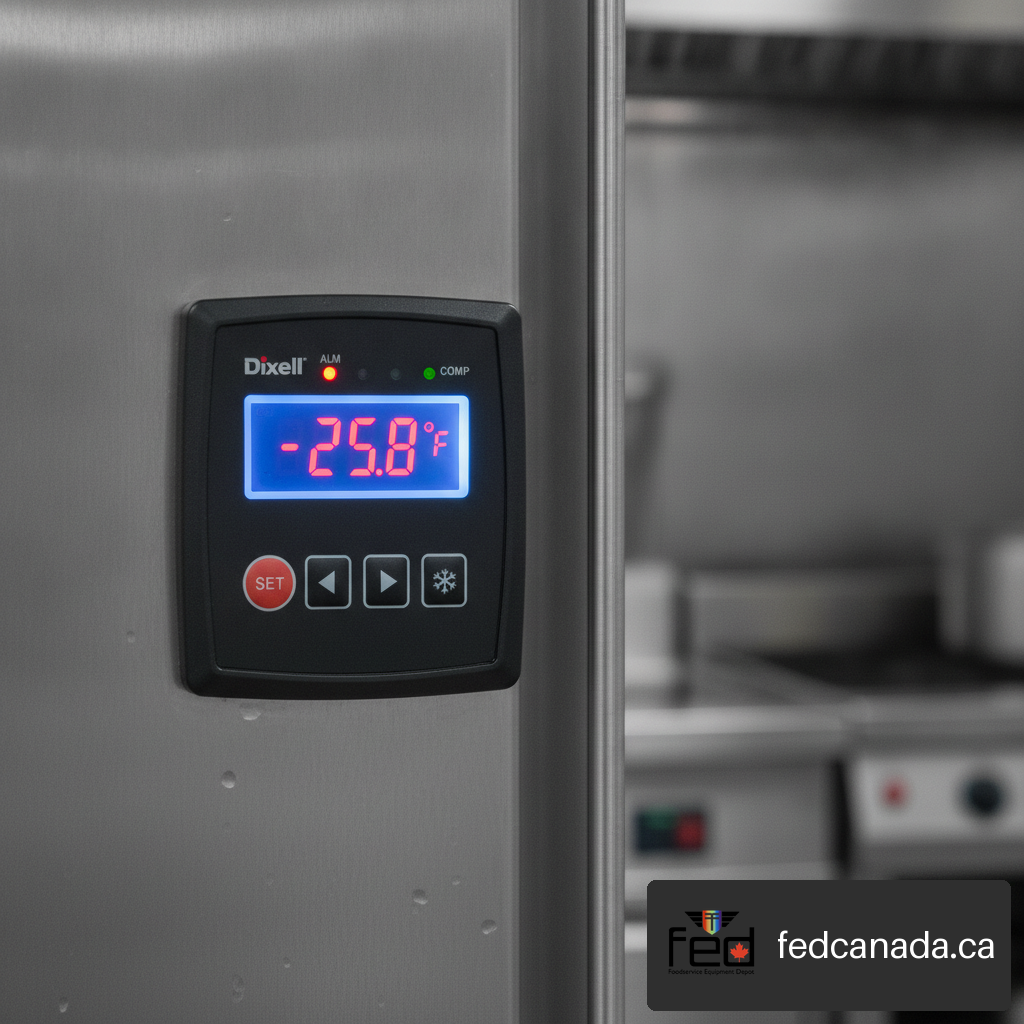
Most modern Atosa reach-in freezers utilize digital controllers featuring an LED display panel with a **SET** button alongside **UP** (arrow up) and **DOWN** (arrow down) navigation keys.
+----------------------------------------------------------------+
| DIXELL DIGITAL CONTROLLER |
| |
| [ SET ] ( LED Display: -04°F ) [ DEFROST ] |
| |
| [ UP ▲ ] [ DOWN ▼ ] |
+----------------------------------------------------------------+
Follow this precise sequence to adjust the target set point:
1. **Initiate Set-Point View**: Press and hold the **SET** button for at least 2 seconds until the current set-point value begins flashing on the LED display.
2. **Verify Temperature Unit**: Observe the display icon. A illuminated **°F** or **°C** LED indicator confirms the active unit of measurement.
3. **Adjust Value**: Press the **UP ▲** arrow key to raise the target temperature (warmer) or the **DOWN ▼** arrow key to lower the target temperature (colder).
4. **Confirm and Save**: Press the **SET** button once more within 10 seconds to memorize the new setting. The display will revert to showing the real-time cabinet air temperature.
5. **Automatic Timeout Exit**: If no buttons are pressed within 10 to 15 seconds, the controller automatically exits programming mode and saves the latest displayed value.
According to the official Atosa glass-door showcase instruction manual, digital glass-door controllers utilize specific key sequences to program set points and enforce distinct timed exits for saving controller parameters.
> **Important**: Never hold the **SET** button continuously alongside arrow keys for more than 7 seconds unless authorized by a technician. Extended multi-key presses access factory parameter menus (such as defrost termination temperatures or probe calibration offsets), where unintended edits can render the unit inoperable.
### Adjusting Mechanical Dial Controls Correctly
On Atosa chest freezers, mechanical thermostats feature a rotary control knob marked with numbers ranging from 1 (warmest) to 7 (coldest), alongside an OFF position.
• **Tools Needed**: A flat-head screwdriver or coin-shaped tool inserted into the dial recessed slot.
• **Increasing Cooling**: Rotate the dial clockwise toward higher numbers (e.g., from position 4 toward position 6).
• **Decreasing Cooling**: Rotate the dial counter-clockwise toward lower numbers (e.g., from position 4 toward position 2).
• **Standard Baseline**: Position 4 represents the normal factory calibration for maintaining 0°F (-18°C) under standard ambient room conditions.
+----------------------------------------------------------------+
| MECHANICAL THERMOSTAT DIAL |
| |
| [ 1 ] ---- [ 2 ] ---- [ 3 ] ---- [ 4 ] |
| (Warmest) (Standard) |
| |
| [ 5 ] ---- [ 6 ] ---- [ 7 ] ---- [ OFF ] |
| (Coldest) |
+----------------------------------------------------------------+
### Utilizing Fast-Freeze Modes Safely Without System Damage
Certain chest freezer models feature a dedicated FAST FREEZE switch or a high-number dial override designed to rapidly pull down unfrozen stock. However, running this continuous freezing cycle indefinitely causes severe operational issues.
According to the Atosa chest freezer instruction manual, models like the MWF9007 recommend dial position 4, mandate a four-hour initial startup run before loading, restrict fast-freeze operation to 4–5 hours maximum, and explicitly warn that setting a mechanical dial to its maximum cold position can cause the evaporator coil to ice over.
## Commissioning, Loading & Temperature Verification Workflows
Properly starting up new or recently serviced commercial equipment guarantees long-term performance and prevents early inventory losses.
### Staged Startup & Pre-Loading Stabilization
Never place warm or room-temperature food into a newly installed or newly defrosted freezer immediately after plugging it in. Refrigeration compressors remove heat gradually; overload conditions during initial pull-down cause extreme component stress.
1. **Unpack & Level**: Position the cabinet on a solid, level surface with at least 3 inches of clearance around air vents and 6 inches behind condensing units.
2. **Electrical Connection**: Plug the unit directly into a dedicated, grounded electrical circuit matching the rating tag amperage (avoid extension cords).
3. **Initial Empty Run**: Power on the cabinet and allow it to run completely empty for a minimum of 4 consecutive hours.
4. **Verify Thermal Pulldown**: Confirm that the internal controller display and external thermometers read within the standard operating range (-8°F to 0°F) before loading products.
5. **Staged Product Loading**: Introduce pre-frozen food in batches over several hours rather than filling the entire cabinet volume all at once.
### Proper Food Storage & Airflow Management
Commercial refrigeration systems rely on forced air circulation (or clean wall convection) to maintain uniform temperatures throughout the cavity. Improper loading patterns choke air circulation, creating localized warm spots.
• **Maintain Fan Clearances**: Keep inventory at least 2 inches away from interior rear walls and ceiling evaporator fan shrouds.
• **Observe Fill Lines**: In chest freezers, never stack products higher than the marked interior load line to ensure cold air seals properly beneath the lid.
• **Utilize Wire Shelving**: Store items on wire shelving grids rather than solid sheet pans or cardboard boxes that block vertical air drop.
• **Avoid Door Over-Opening**: Train kitchen personnel to minimize door opening durations to preserve cabinet thermal stability.
### Calibrating & Using Independent Thermometers
Primary controller displays provide accurate readings for control sensors, but best-practice commercial safety mandates independent verification using calibrated secondary tools.
| Thermometer Type | Ideal Placement | Verification Frequency | Target Reading Accuracy |
| :--- | :--- | :--- | :--- |
| **NSF Hang-Down Dial** | Upper-middle shelf near interior door front | Daily visual inspection | ±2°F (±1°C) |
| **Digital Glycol-Bottle Probe** | Centered on middle shelf immersed in glycol solution | Logged twice daily (HACCP log) | ±1°F (±0.5°C) |
| **Handheld Infrared Probe** | Surface scanning of incoming food inventory | Spot-checking product loads | ±1°F (±0.5°C) |
To calibrate an independent probe thermometer, immerse the sensor tip into a 50/50 slush bath of crushed ice and clean water. After 3 minutes of gentle stirring, the probe should register exactly 32°F (0°C). Adjust the probe calibration nut if variance exceeds ±1°F.
## Diagnostic & Troubleshooting Decision Tree for Temperature Issues
When cabinet temperatures drift out of safe ranges, systematic troubleshooting prevents unnecessary service calls and identifies operational fixes quickly.
### Over-Cooling & Evaporator Coil Icing Failure Loops
It seems counterintuitive, but setting a freezer to its absolute coldest dial position frequently causes the cabinet air to warm up over time. Understanding this mechanical failure loop is essential for kitchen operators:
+----------------------------------------------------------------+
| THE EVAPORATOR COIL ICING FAILURE LOOP |
| |
| 1. Thermostat set to Maximum Cold (Position 7 continuous) |
| ↓ |
| 2. Compressor runs continuously without off-cycle thaw |
| ↓ |
| 3. Ambient humidity condenses and freezes into solid ice |
| ↓ |
| 4. Air passages between aluminum coil fins block completely |
| ↓ |
| 5. Airflow drops to zero; cabinet heat rises (Food spoils) |
+----------------------------------------------------------------+
If you observe heavy solid frost buildup covering the interior evaporator assembly or rear wall air louvers, perform a complete manual defrost sequence:
1. **Power Off**: Disconnect the unit from electrical power.
2. **Clear Inventory**: Transfer stored inventory to an alternate refrigerated cabinet.
3. **Melt Frost**: Leave cabinet doors wide open for 12 to 24 hours until all ice completely drains into the condensate pan (never pick at ice with sharp metal tools).
4. **Clean Condenser**: Vacuum dust and grease accumulation off the exterior condenser fins.
5. **Restart & Reset**: Reconnect power, adjust mechanical dials back to baseline position 4 (or set digital controllers to -4°F), and verify pull-down before reloading.
### Soft Food & High Temperature Diagnostics
If stored food items feel soft or the controller display flashes a high-temperature alarm (e.g., **HA** code on Dixell boards), execute the following diagnostic workflow:
[ High Cabinet Temperature Detected ]
|
Is Condenser Coil Dirty or Blocked?
/ \
(YES) (NO)
| |
Clean Coil Fins with Soft Is Compressor Running
Brush & Vacuum; Recheck and Fan Spinning?
/ \
(NO) (YES)
| |
Verify Power & Check Door Gaskets
Control Relays & Airflow Clearance
• **Inspect Door Seals**: Examine magnetic door gaskets for tears, cracks, or gaps. Perform a paper test by closing the door on a dollar bill; if the paper pulls out without resistance, replace the gasket.
• **Clean Condenser Coils**: Commercial kitchens deposit airborne grease and dust onto condenser fins. Clean coils monthly using a stiff bristled brush and vacuum cleaner.
• **Check Evaporator Fans**: Confirm that interior circulation fans spin freely when door micro-switches engage.
• **Evaluate Thermal Loading**: Ensure hot food items were not placed directly into the cabinet.
### Reset Procedures & Advanced Controller Parameter Locks
If a digital controller displays unusual error codes or stops responding to normal set-point inputs, a system controller reset may be required.
1. **Soft Power Reset**: Unplug the equipment from the electrical wall outlet for 5 full minutes to drain internal controller capacitors, then restore power.
2. **Manual Defrost Force**: Press and hold the **DEFROST** key (represented by a snowflake or melting drop icon) for more than 3 seconds to initiate an immediate defrost cycle.
3. **Parameter Menu Lockout**: If pressing the **SET** button displays **POF** (Parameter Off / Locked), the keyboard is locked to prevent unauthorized tampering. Unlock the keypad by holding the **UP ▲** and **DOWN ▼** keys simultaneously for 3 seconds until **PON** (Parameter On) flashes on the display.
## Atosa Freezer Settings FAQ
### What temperature should an Atosa freezer be set to?
For commercial reach-in and solid-door freezers, set the target temperature between -8°F and 0°F (-22°C to -18°C), with -4°F (-20°C) serving as the ideal operational set point. For commercial chest freezers with mechanical dials, position 4 is the standard recommended setting.
### Does a higher number make an Atosa freezer dial colder?
Yes, on Atosa mechanical thermostat dials, turning the knob toward higher numbers (such as position 6 or 7) makes the unit colder, while lower numbers (such as position 1 or 2) make it warmer. However, setting the dial to continuous maximum cold can ice over the evaporator coils.
### How do I change the set point on an Atosa Dixell controller?
Press and hold the **SET** button for 2 seconds until the set-point value flashes on the LED display. Use the **UP** or **DOWN** arrow keys to select your desired target temperature, then press **SET** again to confirm and save the setting.
### Why is my Atosa freezer warm even though the dial is set to maximum cold?
Running a mechanical chest freezer continuously at its maximum cold setting causes atmospheric humidity to freeze solid across the evaporator coils. Once ice blocks the airflow passages between the coil fins, cold air stops circulating, causing the cabinet interior temperature to rise.
### How long should an Atosa freezer run before loading food?
After initial setup or a full manual defrost, an Atosa commercial freezer should run completely empty for at least 4 hours to stabilize its operating temperature before loading pre-frozen products.
### How do I clear an error code or unlock the controller keyboard?
If the controller display shows **POF**, the keypad is locked. Press and hold the **UP** and **DOWN** arrow keys simultaneously for 3 seconds until **PON** appears. To clear temporary system errors, disconnect electrical power for 5 minutes to reset the micro-controller.
### Should I trust the digital temperature display on the front panel?
While front-panel digital displays accurately reflect the air thermistor probe reading, best culinary management practice requires placing an independent, calibrated NSF thermometer on an interior shelf to verify true product storage conditions.
### What is the difference between fast-freeze mode and normal cooling?
Fast-freeze mode bypasses standard thermostat cycling to provide uninterrupted compressor running for rapid thermal pulldown of bulk items. This operational mode must be limited to 4 to 5 hours maximum to prevent system overload and severe evaporator icing.
## Sources and References
• Atosa USA — Instruction Manual for MWF9007, MWF9010GR, MWF9013GR, and MWF9016GR
• Atosa USA — MCF8607G1/MCF8607G1L User Manual
• Atosa USA — Top Mount Pass-Through Solid-Door Freezer Specification Sheet
• Atosa USA — MCF Glass-Door Showcase Instruction Manual
Recent Posts
Ice Maker Machine Guide: Commercial vs Residential Perf...
31st October, 2026
Santoku Knives: What They Are and How to Choose
31st October, 2026
Restaurant BBQ Equipment: Choosing a Commercial Barbecu...
31st October, 2026
Atosa Freezer Settings, Temperature Controls, Reset & T...
31st October, 2026
Leave a Comment
Your email address will not be published. Required fields are marked *